neatComponents is the hybrid-cloud database engine that powers clearString.
In the Layout Manager, right-click on the page in the website tree.
Choose 'Delete to bank'
Click OK when asked to confirm.
Note: You cannot undo this action. The contents of the page will be permanently lost.
Additional Resources
Created: 2 July 2025 04:32:10
Version: 1.9.6229
Ref: 4345 p
Build Time (ms): 282
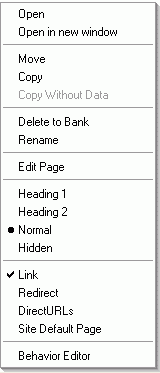 In the Layout Manager, right-click on the page in the website tree.


