How to use this Tutorial
Two monitors
 If you have two-screens available on your computer, or another monitor near-by, then the easiest way is to have it open on one screen, and work on the other.
Phone
 Each page in the tutorial has a QR code on it. Simply point your Android barcode reader app or iPhone barcode reader app at it, and the page will open on your phone. Open the site on your computer and follow the tutorial on your phone.
Printer
 Each page in the tutorial has a printer link on it. Simply print out the page then open the site on your computer and follow the tutorial on your print-out.
What we cover:
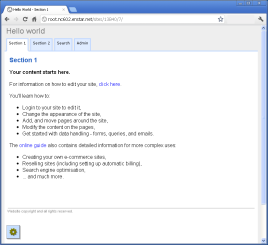
This tutorial gives you some immediate experience of using the system, working with components, and layout, seeing how a site is constructed and generally getting into the mindset. You will:
- Create your first application
- Login to your app to edit it
- Change the appearance of the app
- Add, and move pages around the app
- Modify the content on the pages
- Get started with data handling - tables, forms, queries, and emails
How long?
You'll need to set aside about half an hour or so for this tutorial.
Orientation
Before we get started, here are a couple of handy tips worth knowing:
Toolbox
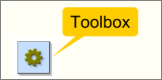
... notice the floating Toolbox in the lower left corner of the window when you are logged in to your own site - it's the key to working with the system. You can hover over it to display its menu.
Dialogs are context aware
The dialogs that control the system behavior are context aware. This means that you are presented with only the controls you need for the task in hand. As your task changes, so the available controls change - automatically.
As you build more advanced applications the appropriate control dialogs will become available. You are never faced with a large array of confusing controls.
Use the default settings
The system has been designed as a full-stack system to 'simply work' - many actions work automatically by default. If you are coming from a traditional hand-coded relational database environment you will find that many common tasks happen automatically.
You do have fine grain management over all controls, but you will find that the default settings are often already optimized.
Let's get started...
You simply start following this short walk-through - the first few steps are fully detailed, but as you work through we increase the pace - so you don't get bored.
Click on the appropriate link below depending on where you have the system:
Below the line...
More advanced usage
This tutorial is of a very simple usage, so you can quickly see how things work. 'The Guide' online documentation also contains detailed information for more complex uses:
- Form construction,
- Data integration, email - RSS - XML - Twitter feeds and aggregation.
- Data manipulation, and custom web and data applications
- Creating your own e-commerce sites, membership management.
- Replicating microsites.
- SaaS service reselling sites (including setting up automatic billing).
- Search engine optimisation, site-maps, direct-URLs.
- ... and much more.
You will find detailed information, tutorials and configuration advice in 'The Guide'.