 |
|

|
clearString neatComponents
|
|
clearString neatComponents Events - triggering emails |

| ||
| Application Development | |
Events - triggering emails | ||
| |
Creation or modification of a Table record can trigger the sending of emails - 'event-driven emails'.
There is no limit to the number of emails that can be triggered by the addition of a record, and each email could be sent to multiple people.
.png)
Uses include:
- simple confirmation-of-change emails notify someone about the new/changed record.
- sending the contents of the new/changed record to all the members of a usergroup (ie a mailing list).
To set up an event-driven email
- Browse to the Table component*
- In the Toolbox, Select 'Configure'
- Choose the Events tab
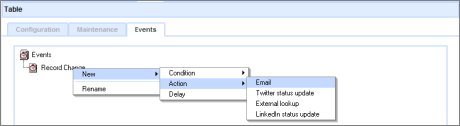
- You can now add Conditions and Actions to the Event tree. An Email is a type of Action.
Delays
Delays allow you to postpone an action – such as the sending of an email, or the posting of a tweet – rather than doing it straight away.
Read about configuring Event Delays here...
Example
See a detailed example in: A First Site
* You can also set events on a Data Entry Form attached to a Table. In that case, the event will be triggered after the change is made through the Data Entry Form.
Social Networking
Events can also trigger Twitter postings (Tweets) and Facebook status updates.
Read more about sending Tweets here...
Advanced
Learn more about advanced usage of Events in the free Twitter Application download.
Copyright © 2026 Enstar Systems Inc. All rights reserved |