 |
|

|
clearString neatComponents
|
|
clearString neatComponents Data Import - XML & CSV |

| ||
| Application Development | |
Data Import - XML & CSV | ||
| |
.png)
This section documents the various methods used to integrate with other system, for importing and exporting data, either on an ad-hoc/one-off basis, or for more automated synchronisation.
Data is normally held within the system in Tables. The mechanisms described import data into the Tables, or export the data from them, using industry standard protocols.

Data Import
Imports:
CSV, XML, RSS, & Atom feeds
When to use:
To import structured data from other servers into one or more Tables, for one-off transfer, ad-hoc queries, or for periodic synchronisation. This is the most powerful method for inter-server integration.
Scheduling:
Imports can be scheduled.
Notable features:
Can authenticate with secure feeds, handle failover urls, import into multiple tables, and trigger further lookups from separate feeds. It can be triggered by a user making a search. It can suppress making a lookup if the information is already in a Table.
XML Data Connection
The Data Import Component component provides a powerful interface to pull data into an application from XML sources.
CSV Data Import
The same Data Import Component component provides a comprehensive interface to manage CSV format data exported from other applications.
Data Import Component

External Lookup Data Feed
(The Data Import component replaces the old ELDF)
Capabilities and Configuration: Read more...
Summary of component capabilities
Configuration documentation
Configuring an External Lookup Data Feed to import an RSS feed
See also:
- Triggering Lookups
- General Settings
- Request URLs
- XPath Namespaces
- Fixed Request Parameters
- Cache Table Field Mappings
- Response Errors
Bulk Import Script
Bulk import of data from the common CSV data export/interchange format using a script.
Imports:
CSV files
When to use:
If your data is in a CSV file, and you have easy access to run operating system commands on the server running neatComponents
Scheduling:
This is designed for ad-hoc / one-off imports. (However you can schedule repeat imports using external operating system level scheduling tools)
Notable features:
It can see into zip files without you having to extract them. So if you need to import a large collection of images, you can upload a single zip file, and configure the script to iterate through all the files in it.
Read more:
Configuration documentation
Example of usage importing images
CSV View
The CSV view is provided to enable Data Export 'on demand' simply by loading the page.
Exports:
CSV files
When to use:
To produce CSV files for use in third party applications: databases and spreadsheets.
Scheduling:
This is designed for ad-hoc usage. CSV reports are built in real-time in response to an HTTP request.
Usage: simply add the parameter ?action=download to the request.
For example: http://www.example.com/datasource-page?action=download
will download the first CSV view on the page with the DirectURL of /datasource-page. A third party tool, or the receiving application could be scheduled to request the file.
Display on page
If you do not put
?download=true
at the end of the page url you will get the raw CSV file downloaded.
You will 'display' the CSV content in the context of an HTML page - so you can see the output.
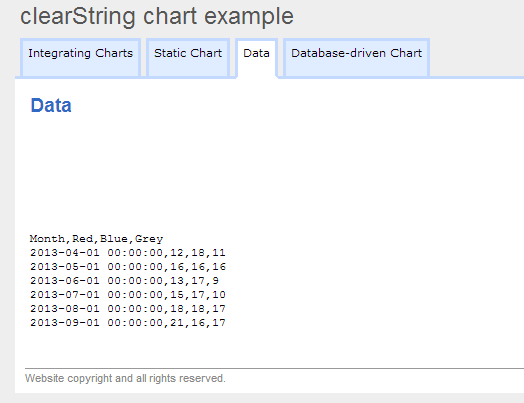
Example:
RSS View
Exports:
RSS feed
When to use:
To produce RSS feeds for feed readers, or to synchronise data from one site with another.
Scheduling:
This is designed for scheduled access. Reports are cached once generated, and regenerated when their time-to-live has expired. This allows the feed to respond to heavy request load without overburdening the server.
A third party tool could be scheduled to request file.
Copyright © 2026 Enstar Systems Inc. All rights reserved |