 |    | |
|
|

| ||
| Installing | |
Upgrade Protection | ||


Upgrade Protection Explained
Upgrade Protection provides two benefits.
1 - Upgrade Protection gives you free upgrades to the latest version.
This ensures you have access to up to date Components and all updates.
2 - Valid Upgrade Protection is required for all Support services.
In order to receive support you must be running the latest Release version.
Cloud - SaaS and PaaS (Pay-as-you-go) Licenses
SaaS and PaaS licenses include Upgrade Protection for the duration of the purchased period.
SaaS and PaaS installations are automatically upgraded. No user action is required.
On Premises - Permanent Licenses
Permanent licenses come with 12-months Upgrade Protection which gives you free upgrades to the latest version for 1 year.
At the end of that period you must renew your upgrade protection to continue to receive support, and to enable access to software upgrades.
Upgrading Trial 'On Premises' Downloads
The trial license provided is a full Enterprise Platform License - with no rate-limiting.
At the end of the trial period this license will automatically become a Developer license. There is no reduction in capability, but a rate-limit is imposed and the upgrade protection will end.
You can upgrade your trial license from your account here: My Account
If you do not already have an account follow the prompts to create a new one
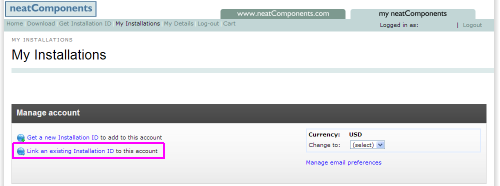
Then use 'Link an existing Installation Id' to link your trial Installation Id to your Account.
If I have a Permanent license do I have to renew my Upgrade Protection?
A Permanent license will work forever. If you do not renew your Upgrade Protection you will no longer be able to upgrade to get new feature or updates, and you will no longer get access to Support.
How much does it cost to renew Upgrade Protection?
Renewing Upgrade Protection costs ~30% of your current license cost.
What happens if I forget to renew my Upgrade Protection?
You can still renew. You will be billed pro rata from when your Upgrade Protection expired.
More information
Renewing your Upgrade Protection
If your Upgrade Protection has expired then can renew it at your account at: My Account
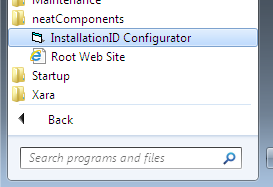 The Installation Id can be accessed, and if needs be changed at the Configurator.
| |
Copyright © 2026 Enstar Systems Inc. All rights reserved |