 |
|

|
clearString neatComponents
|
|
clearString neatComponents Getting Started |

| ||
| Installing | |
Getting Started | ||
| |
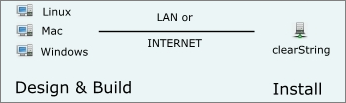
What is On-Prem? The neatComponents server software that powers clearString and powers all your sites and applications is installed on one machine, accessed either on the LAN (local network) or across the Internet, or in the Cloud or at a hosting company. All design, build and management tasks are then managed using your browser - Safari, Edge, Firefox or Chrome on your regular desktop - Linux, Windows or Mac - from anywhere. neatComponents is a multi-tenant platform, providing multiple independent applications and sites under an integrated hosting and client management system. The neatComponents installer will hand you through the process, including database installation, with minimal interaction required. Just testing?
Where to install
| |||||||||||||||


Installing and Support In this section |
|
Installing and Support In this section: |
|
Copyright © 2026 Enstar Systems Inc. All rights reserved |