 |
|

|
clearString neatComponents
|
|
clearString neatComponents Setting a fixed IP address |

| ||
| Installing | |
Setting a fixed IP address | ||
| |
Setting a fixed IP address
LAN Installations only
Set the IP Address on the machine
The neatComponents machine, real or virtual, must have a Static or fixed IP address on your LAN.
Note
If you have installed onto an Amazon EC2 Cloud Instance, or are using a remotely hosted dedicated server normally you should not set a Static IP address without consulting the hosting provider.
You must make sure that the Network Properties of the machine you have installed neatComponents on is set to have a fixed IP address on your LAN. New Windows installations are normally set to DHCP, or dynamic IP address which is not suitable for hosting your own websites.
This is set in the Local Area Connection properties.
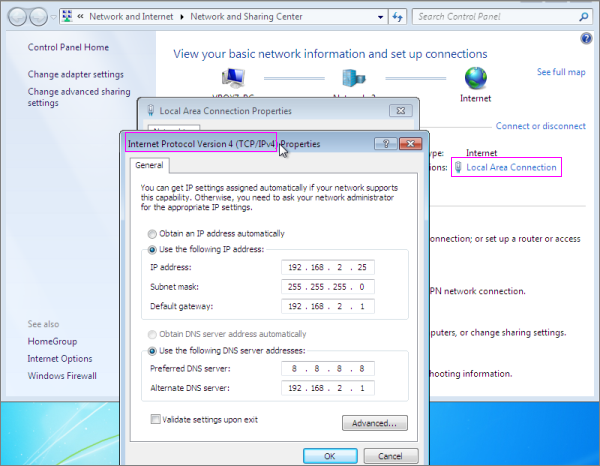
Set the address to be an available IP address on your LAN, and set set the Subnet mask, Default gateway and DNS servers.
The IP address must be unique, (and not the same as the host-machine if you are using a virtual machine).
You may be able to model these settings on another working machine on your network.
Different operating systens have slightly different looking dialogs, but all versions of Windows are very similar.
Setting up access In this section |
|
Setting up access In this section: |
|
Copyright © 2026 Enstar Systems Inc. All rights reserved |