What are we learning here?
We learn how to create a Query to extract the data stored in a Table.
Continuing with: The Feed - Query - View model
The 'Query' enables us to look at the data collected from the Data Entry Form, and the Embedded View allows us to display that information on the website.
We will display the list of visitors to the website and their email addresses we collected using the Data Entry Form on the currently blank 'Section 2' of the trial website.
Creating a Query
Add a Query to the website. We don't want the Query to show in the navigation - a visitor will never use it directly - so place it in the Config section created earlier, at the bottom of the tree where we earlier placed the table.

 When working on 'real applications' you will often have many Queries.
To make it easy to keep track of which one you are working with follow a naming convention for each section or module of your application, for example: "catalog.product" or "customer.email"
Components are listed alphabetically in the pickers, so having a sensible naming convention makes it easy to select the correct instance.
Open the Query in a new window. Right-click in the upper area of the Query as prompted, and [Add Source] Then select the Email 'Table' - it is probably the only item offered.
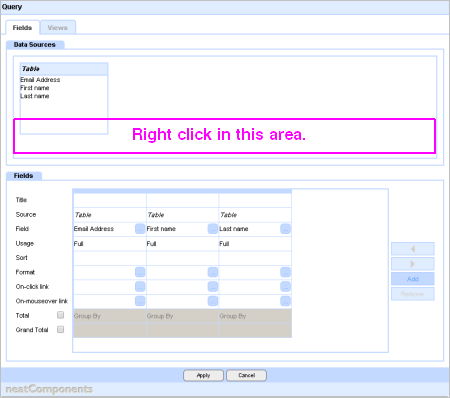
Add the Fields from the Email 'Form Table' to the Query window - you can click-and-drag or simply double-click. If you want to change sequence or remove a Field you can select the field by the thin header-bar and use the controls to the right to change position or remove a column.
The Field will 'Show' by default, but you will need to enter the Title for each field to be displayed on the page. We will want the output to be displayed on the page in Ascending order by 'Last Name', so click in the 'Sort' cell and choose 'Ascending' from the drop-down list.
 Let's now Define the View that we use to display the results of the Query.
Below the line...
More information:
1 - In this example we are going to be embedding the output from all of the columns in this query on the same page - Section 2 of the website - so the Link Target is the same for each column. It is very often the case that you will want to display query outputs on different pages - that is why they are set individually.
2 - You can set whether a Field is visible, and how it is used at the Usage control.
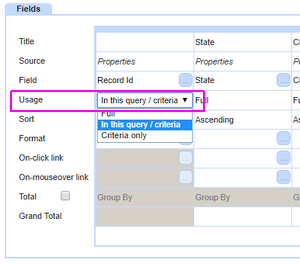
Full will make the Field visible. In this query/criteria will not show the Field, but the Parameters will be generally available and Criteria only restricts the use of parameters to ones you specify. The Criteria only option is provided to enable optimization in complex applications